Overview
Teaching: 45 min
Exercises: 0 minQuestions
How can I use version control to collaborate with other people?
Objectives
Fork an existing repository.
Clone a remote repository.
Collaborate pushing to a common repository.
Merge in changes from an upstream repository.
Finding Repositories on GitHub
Now, we will see how GitHub can be used as a powerful collaboration tool. To begin, we need to navigate to the countries repository the instructor created during the set up for this lesson. In the search box on the top, search for the name of the repository.
GitHub allows users to search on different levels. If you are already it in a repository, it will automatically search within that repo. As an indicator, “this repository” will appear in the search bar. Since we want to search all GitHub repositories, click the GitHub icon to reset the search settings.


Once we have located the repository, clicking the title will take us to the repo. There is one folder and a README.md file within the directory. We can explore the files within the GitHub interface. Click on countries and then any of the markdown(.md) files.
README.md
Remember that it is best practice to always have a README.md file within your repository. It should be descriptive so others (or you in a few months) will understand the purpose/structure of your code.
Each of these files contains spaces for information about the population, capital, offical language, and interesting trivia for a specific country. Our goal today is to update a few of the files with information about the designated country.
Unlike our earlier experience GitHub, we do not own this repository. We can quickly identify the owner by looking at the repostiory name located directly beneath the search bar. The first part of the name is the GitHub user who owns the repository followed by a slash and the repository’s name. The owner could be an individual or organizaiton.

Forking a Project on GitHub
Since we do not own this project, we don’t want to make changes directly to this code. Instead, we should make a copy of the code, make our changes, and submit it to the owner. If the owner likes our changes, she can then incorporate it into the original repo.
In GitHub, making a copy of a repository is called forking. In the top right corner of the page, under your profile picture, there are three buttons. Click on Fork to create a forked copy of the repo. The number beside Fork indicates the number of times the original repo has been forked.
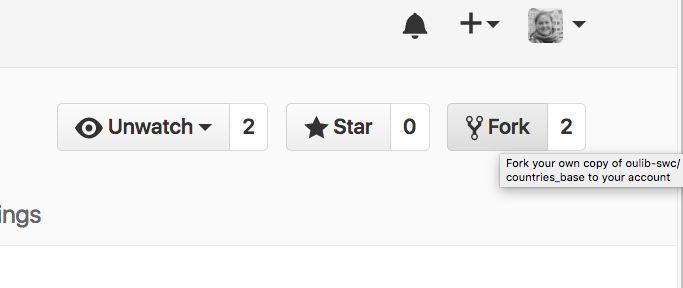
After you fork the repo, GitHub will automatically redirect you to your forked verison. The forked repository is identical to the original repo. The forked verison includes all of the commits and contributors as the original.
Selecting where to fork
If you are a member of organizations on GitHub, you will need to select where you want to fork the repository. For this exercise, please select your personal GitHub account.
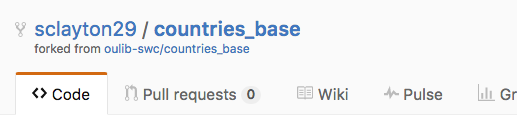
If we look at the title, we can see that the owner has changed. Now, our account name is listed before the name of the repository. There is also a link to the original repo.
Cloning your fork
Now that we have our own fork, we are ready to start adding information.
First, we’ll clone our fork so that we can modify it.
$ cd ~/Desktop
$ git clone https://github.com/YOUR-ACCOUNT/countries.git
Working Locally On Your Fork
In your locally cloned repository, edit the file in the countries folder, make your changes to the country that you wish to update.
$ cd countries
$ nano United_States.md
Once you’re happy with your changes, commit and push them to your forked repository as normal:
$ git add United_States.md
$ git commit -m "Updating facts about the US."
$ git push
Sharing Your Work on GitHub
With your new changes pushed to GitHub, you can use the GitHub web interface to create a Pull Request to share your changes with owners of the upstream repository.
Updating Your Fork
In order to keep your fork up dated and get any new changes made in the upstream repository, you’ll need to merge in upstream changes manually.
Begin by adding your
$ git remote add upstream https://github.com/oulib-swc/countries.git
$ git fetch
$ git branch -a
$ git merge upstream/master
$ git push
Key Points
To work on someone else’s code, you will typically need to fork their repository.
Collaboration on GitHub is driven by Pull Requests.
git clonecopies a remote repository to create a local repository with a remote calledoriginautomatically set up.